
| The top reasons why you should use irssi |
|
Here is a list of the most useful features of irssi. Last updated on 10 Sept 2003.
| perl scripting | irssi supports perl scripting. This means very flexible and powerful scripts. The interaction with irssi events and properties are very intuitive. Also, there are many existing scripts which provide both useful extra features and the required assistance to make your own irssi scripts. |
| defaults | unlike some other clients, irssi has very sensible default settings. No auto-rejoin when you're kicked, no public (auto-)away-crap, no bold messages, no reconnecting without delay. |
| non bloated | unlike some other clients, irssi doesn't put everything, standard or non-standard, in its core; everything non-standard is done via the perl scripts. So you can choose yourself which extra functionality you want to have. |
| bitchx theme | for all you BitchX lovers out there. With this theme irssi will look just like BitchX. |
| regular expression hilights | By default, irssi uses a different colour in the [Act:] bar for hilights than for normal text. You can add hilights in any colour for any regexp though, for example /hilight -regexp -actcolor %R gaa+r+i+o+n. This will create a bright red Act: number if someone says "gaaaaaaariooooooooon" in a channel. |
| regular expression ignores | by typing /ignore -regexp -pattern "COMPLETELY FREE" * MSGS irssi will ignore all messages to you with "COMPLETELY FREE" in them, regardless of who sends them. |
| lastlog searching | this makes searching in the backbuffer of any window very easy. Searching for all the times somebody triggered a hilight is done by /lastlog -hilight and finding all mode changes to a user goes with /lastlog -mode [user]. You can also look for words or regular expressions. |
| scrollback skipping | the scrollback command is very useful. Most often the goto functionality is used: /scrollback goto [time|line]. A lot easier than pressing pageup for 10 seconds. Also, use /sb home|end for skipping to the beginning or the end of a log. |
| multi-server support | nothing new here; many clients have this. Still, irssi's multiple server support is excellent. Connections to a server are not bound to any windows, and many commands have a flag to determine which network they are to be issued on. |
| mode merging | when 3 people give ops to the same person within a short timespan, irssi shows just 1 line, instead of 3. |
| netsplit detection [screenshot] |
gotten tired of those pages full of netsplit crap? irssi detect the netsplit and shows all the people who quit or join on one single line. |
| tab-completion | irssi features tab-completion for almost anything. Commands, nicknames, channels, servers, you name it. And you can add more via simple perl scripts. |
| self-defined completions | and if there aren't enough pre-defined tabcompletions for you, you can define your own completions for terms or phrases you use often. Then just type the short version, and the tab key, and it's expanded to the long version. Not just commands, but anything can be completed in this way. |
| completions | this is a user defined list of automatic completions, mostly used to automatically correct any typos you make or to expand text to longer text. |
| configurable keybindings | it's very easy to bind any key or key combination to any built-in or self-defined function. |
| plugins | irssi features some useful plugins, for example a WAP plugin, an ICQ plugin and a SILC plugin. |
| upgrade | when you've installed a newer version of the irssi binary, it's not necessary to quit irssi and restart it. Just do /upgrade and the new binary will be loaded, maintaining all connections to all irc servers. |
| statusbars | irssi features multiple very easy to configure statusbars, to which you can add statusbar items from scripts. For example, add an extra statusbar with the amount of mail you have in each of your mailboxes. |
| formats and themes | easy yet powerful and consistent way to customise the client's look and feel. This formatting is modular; in other words, you just change the appearance of the 'nick' object, and the appearance of the nickname will change in all the formats that use that nick object. |
| autologging | irssi can automatically log any channels and/or queries that you want. Logs will be separated per irc network, and even logrotation is supported. |
| paste detection | irssi tries to detect when you're pasting large amounts of text, by looking at the speed that characters are entered. If such pasting is detected, [tab] characters are sent as-is instead of replaced by /msg somenick, and lines starting with a / are not executed but sent. |
| ssl | irssi supports ssl client-server connections. |
| irssi-proxy | irssi-proxy is (obviously) an irc proxy, but it's much more than just a bouncer. Read the full explanation of irssi-proxy. |
Ok, I think that it's time to start mentioning some of the very best scripts, that seem to be used by many people using irssi. All these scripts can be found on the irssi script archive (scripts.irssi.org), or on the irssi scripts rating page. Here is a short list:
| scriptassist | The mother of all scripts. This is for irssi what apt is for debian, and ports are for FreeBSD. Using this script you can fetch any other script, check for versions, upgrade scripts, toggle autorunning of scripts, and much more. |
| trackbar [screenshot] |
This script keeps track of what the last thing in a certain window was when you switched away from it. Then, when you switch back to that window, the trackbar will be directly below the line you last saw. There is one trackbar per window. |
| usercount | Adds a statusbar item that keeps track of the number of opers, ops, voices and normal users in a channel. Most people use a display like [45 users (*1 @9 +4 32)] but personally I prefer using colours instead of the symbols *, @ and +. See in the bottom left of the usercount example image. Blue is opers, green is ops, yellow is voices. |
| Adds a statusbar item that shows how many new emails you have in each of your mailboxes/maildirs. Works only if your irssi runs on the same machine as your mail client. Shows a message like [Mail: main-4,work-2,debian-3]. | |
| keepnick | Simple script to keep 'your' nickname. |
| splitlong | When pasting long lines, this script makes sure your lines don't exceed the maximum length ircd allows, and splits them over multiple lines. |
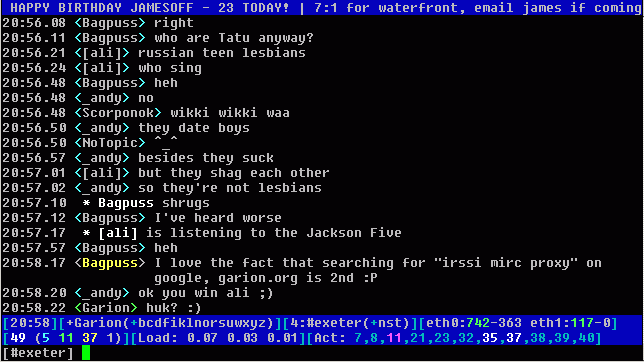
| niq [screenshot] |
When tab-completing nicknames, this script will show a list of available nicknames in the statusbar, if the tabbing is not unique. |
| chanact | Allows a configurable Activity statusbar item. So instead of [Act: 1,2,5,7] you could see [Act: #ch1,#ch2,query,#ch3]. |
| dccstat [screenshot] |
Shows verbose or short information of dcc send/gets on statusbar (speed, size, ETA etc.). |
what else? - know of something I forgot? Email it to garion (at) efnet (dot) nl or tell Garion on #irssi (both on IRCnet and EFnet).
![[screenshot]](screenshots/netsplit.gif)
![[screenshot]](screenshots/trackbar.png)
![[screenshot]](screenshots/niq.png)
![[screenshot]](screenshots/dccstat.png)